
Narrating the “Back Story” Through E-learning Resources in Libraries
We at In the Library with the Lead Pipe are happy to welcome two guest authors to our blog! Hyun-Duck Chung and Kim Duckett are two of our creative and inspiring colleagues at the North Carolina State University Libraries. Read on to learn more…
By Hyun-Duck Chung and Kim Duckett
Lately we’ve been thinking a lot about the creation and re-use of online instructional content in libraries. To be more precise, we’ve been thinking about categories that might characterize the instructional intent behind some of this content creation. A casual survey of materials online suggests that much of the content focuses on how to use a tool, or how to follow a process. There seems to be less content that helps explain why the information landscape is organized the way it is. This background explanation, or “back story” can be useful in contextualizing how information is created, debated, vetted, and why we find information the way we do. In this way it also has the potential to help student researchers become more critical of their search for, and use of, information. In this post we discuss our experience of providing the back story of peer review using an e-learning resource. But first, let’s take a brief look at the growing interest in e-learning resources in libraries today.
E-learning Resources in Libraries
“E-learning resources” is our shorthand for describing asynchronous, web-based instructional content. In other words, media that is hosted and disseminated online for the purpose of teaching and learning in the form of html tutorials, interactive video, flash animations, screen captured presentations, and the like. Instructional designers may use the term “learning objects,” but we do not use it here as it has been criticized for being overly broad and therefore less than useful. ((See for example, Polsani, P.R. 2003. “Use and Abuse of Reusable Learning Objects.” Journal of Digital Information 3, no. 4 (February 19).)) Bell and Shank prefer the phrase “digital learning materials,” but their definition emphasizes “interactivity” as a key defining character. ((Bell, S. & Shank, J. (2007). Academic Librarianship by Design. Chicago: American Library Association.)) While interactivity is certainly a worthwhile goal, many useful e-learning resources in libraries simply don’t meet this criteria so we’ve opted to use our own more inclusive term. Regardless of terminology, we’re basically referring to the notion of modular web-based instructional content that may be re-used across multiple courses, course sections, disciplines and even among various libraries.
Librarians have been creating e-learning resources for years, but the importance of this type of library or user instruction appears to be growing. This trend can be seen in
- frequent discussion about technologies for creating e-learning resources on library listservs and blogs; ((OCLC’s white paper “Libraries and the enhancement of e-learning” (2003) provides a more in-depth discussion than we will offer here.))
- popularity in the use of screencasting tools such as Camtasia Studio, Adobe Captivate, Jing, and Qarbon Viewlet Builder;
- organized ways to share e-learning resources through repositories like A.N.T.S. ((The Animated Tutorial Sharing Project based in Canada is an example of a collaborative project emphasizing the re-usability aspect of these resources. The A.N.T.S. project tries to coordinate development and re-use of modules beyond a single institution by tracking useful metadata (such as what modules are in the works) and hosting completed projects on a shared Screencast server for anyone to use.)) and MERLOT; ((The Multimedia Educational Resource for Learning and Teaching is an online repository of peer reviewed digital learning materials. The collection spans across many disciplines and includes a “Library and Information Services” category.))
- programs that review, highlight and promote high-quality e-learning resources, such as the ACRL PRIMO database; ((PRIMO is the Peer Reviewed Information Materials Online” database. It focuses on promoting and setting best practices for implementing e-learning resources so that librarians can share ideas for creating them. At the time of writing, the database holds 191 records for materials that range from database specific modules to information literacy tutorials.))
- and the publication of books that focus on best practices for designing e-learning resources. Susan Sharpless Smith’s Web-based Instruction: A Guide for Libraries (2nd edition) and Bell and Shank’s Academic Librarianship by Design are two well-known examples.
The trend seems to be undeniable, but is this a useful trend?
Extending Our Reach through E-Learning Resources
The proliferation of e-learning resources can perhaps be attributed, at least in part, to the useful potential they offer for greatly expanding the reach of a single instructor or instruction session. The one-on-one instruction or consultation at the reference desk relies on reaching only one person at a time and only those that approach the reference desk or library staff.

One to One
Workshops or classroom instruction expands that reach to “one-to-many”, connecting with students who may not (understandably) consult or even know about the expertise of librarians by their own initiative. E-learning resources have the potential (with good quality, relevance, and proper marketing) to expand the reach even farther to “one-to-many-more,” helping librarians find an audience otherwise inaccessible.
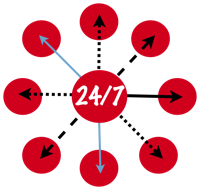
One to Many More
Categories of E-Learning Resources
Since interest in e-learning resources continues to grow, we thought we’d better start thinking about them in more detail. Recently, we sat down with colleagues at the NCSU Libraries to categorize the kinds of e-learning resources we have been developing locally and those we’ve seen elsewhere. Though the discussion is ongoing, to date we’ve come up with three categories that enable us to think more strategically about both the purpose and uses of these resources. Here’s a list of our categories with examples from various libraries:
CATEGORY 1. Teach students HOW TO USE A TOOL. This category includes screencasts and tutorials that show users how to search a particular database, the library catalog, or a library website:
- Mergent Quick Start Video Guide linked with other guides from Hyun-Duck’s Business Plan Research Guide (NCSU Libraries)
- Z. Smith Reynolds Library Toolkit is a suite of short screencasts teaching users how to use features of article databases, the library catalog, and library website — what a great concept! (Wake Forest University Library)
CATEGORY 2. Help students WITH A PROCESS. Resources in this category help learners with processes such as evaluating websites, creating citations, identifying a scholarly article online:
- Anatomy of a Scholarly Article is an interactive guide identifying various parts of a scholarly article (NCSU Libraries)
- Citing Information Tutorial (UNC Libraries)
CATEGORY 3. Provide students with MORE CONTEXT to understand a process or concept — the BACK STORY for how information is created, vetted, stored, accessed, and used. Resources in this category address social issues surrounding information and other scholarly communication topics:
- Journal Costs is a “sticker shock” website that exposes the costs of journals that are so often hidden from users (Vanderbilt University Library)
- Primary or Secondary is an interactive site that teaches users about primary and secondary sources (University of Washington Libraries)
There certainly may be more categories than these and none of the above may be mutually exclusive. For instance, large-scale information literacy tutorials are typically a blend of more than one category. We hope that by teasing out the themes and intentions of various resources, we can better design them for use in more than one instructional context. Librarians should strive to have the greatest impact from all the work and energy currently being invested into creating them.
More Back Story Please!
From a very rough survey of e-learning resources online, the landscape seems to be dominated by the first two types of categories. Perhaps this is because librarians have traditionally played a role in teaching students how to use specific kinds of tools to find information or to offer strategies for evaluating sources. It might also be that since libraries make these information resources available, we see it as our responsibility to help our users make use of them. But consider how librarians are uniquely positioned to design and develop e-learning resources that provide students with the back story about sources of information. Such concepts are rarely covered by faculty instructors within a given academic discipline, yet they fall squarely in the realm of librarian expertise. Most importantly, they help to explain realities that might otherwise seem odd to students. For example, why is so much importance given to finding “peer-reviewed” articles for an assignment? Or why does Google Scholar sometimes ask for money and what should you do to get around it? Without some background on how information and publishing “work” on the Web, students may be just going through the motions of “how-to” find information without critically reflecting on the process of solving their information problem.
Providing learners with the back story enhances understanding and use of information. Consider the pairs of questions below:
How do I identify a scholarly, peer-reviewed article?
VS.
What is peer review and why is it important?
How can I use Wikipedia in my research?
VS.
How did the information get created in Wikipedia?
How do I get started with my literature review?
VS.
What is the role of a literature review in research?
The pairings go hand-in-hand, yet often library e-learning resources are limited to answering the first questions in each set. Why don’t we cover the second questions in as much depth? Could we be making e-learning resources that provide more context? After all, understanding the back stories that address the second questions are fundamental to information literacy, participation in scholarly communication (especially for those students who will become part of it in a few short years), and most importantly, lifelong learning. They are also topics that span across many different learning scenarios and across institutional boundaries.
For Instance, Peer Review in Five Minutes
Since this notion of providing a back story can be slippery, let’s look at a concrete example where we tried to incorporate some of the ideas we’ve raised above. Our interest in the back story led to our recent development of an e-learning module – an animation on the role of peer review in scholarly research.
Click to play Peer Review in 5 Minutes
Students often come to the service desk seeking peer-reviewed articles as part of a class assignment. At this point the student may need help with accomplishing a number of tasks. Perhaps they need help identifying or verifying that the article has been peer-reviewed, searching in article databases, or understanding what a peer-reviewed article is in the first place and why it is so important in academia. Since we found existing e-learning resources addressing the first two needs, we saw an opportunity in meeting the third need through a new e-learning resource. We came up with the concept of Peer Review in 5 Minutes – an animated video that would initiate students into one of the key facets of academic culture.
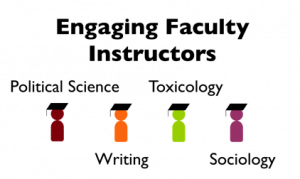
Following the ADDIE model ((ADDIE — analysis, design, development, implement, and evaluate — is one of the most common instructional design models. Bell and Shank’s Academic Librarianship by Design provides a wonderful overview.)) often used in instructional design, we based our design decisions on early input from potential users. Since faculty members are often the most influential factor in motivating students to pursue learning activities, we conducted informal interviews with faculty from various academic disciplines to test our assumptions on the usefulness of our idea. The response was very positive and our open discussions helped us tease out the various aspects of peer review as a topic as well as identify specific and different disciplinary needs.
A significant challenge we faced early in the process of creating the resource was scoping the content. From the broad array of ideas that came out of our interviews, zeroing in on what to include and exclude in a five minute video required an iterative process of thinking and re-thinking the goals of the video and defining our target users and their needs. In the end we decided to focus on providing a general overview of peer review for undergraduate students. Since this project was our first experiment in animation, we wanted it to serve as a proof-of-concept for reaching learners in a new way and in turn acquire departmental support for launching similar projects in the future. Targeting a broad and general audience like the undergraduate population would 1) allow us to have the broadest impact for the time and energy committed to developing the resource, and 2) there was a greater likelihood of receiving feedback from the users.
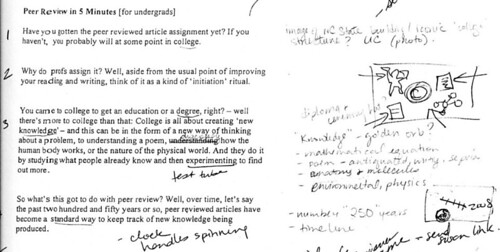
An additional challenge we faced was finding the right way to explain the back story. Where do you begin to tell the story? Where do you end it? How do you make it relevant to the student’s tasks? How do you make the content general enough to span across disciplines, yet relevant enough to each? Tackling such questions required creative narration, visuals that went well beyond screenshots, plus fairly creative use of scripting and story-boarding. In doing so we went through numerous revisions in the development process.
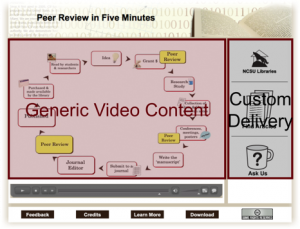
Another challenge we faced was in designing truly reusable content that was also highly relevant to our institution. Since we intended to create a resource for broad dissemination we also thought it would be strategic to have the video specifically point to our library’s subscription-based resources and reference services. This way the e-learning resource would not only serve instructional needs, but also market specific library services and resources to our students. Our solution was to limit any institution specific aspect to a very small scene at the very end of the video. We then, as a service to the broader educational community, created an alternate ending for a second downloadable version that was not tied to our institution. We also made this version available under a Creative Commons license so that anyone could freely use it for non-commercial purposes. To get the video go to Peer Review in 5 Minutes and click on download.
Despite the challenges we faced in developing this resource, the highly collaborative process of development offered a unique opportunity to connect with faculty, staff and students in departments within and outside of the library. The success of the project relied on recruiting the expertise and skills of various contributors. In addition to the faculty we interviewed, we worked closely with
- a graphic design intern who created the animation; ((Susan Baker, then a senior student in the College of Design, worked closely with us to create original graphics and animate them using AffterEffects in Adobe Creative Suite 3))
- a student from the Libraries’ Digital Media Lab who created an original sound track to the video; ((We showed Chris Hill our video and some sample music online to offer a sense of what we were looking for and he created an original track using GarageBand))
- a couple of library colleagues who contributed their technical expertise in developing an effective web presence for the video online. ((Jason Walsh and Andreas Orphanides worked their magic to format the video for optimal viewing online through progressive downloading, and with the help of Susan created the custom border around the video.))
We also consulted multimedia specialists in our distance education office about meeting accessibility requirements for creating audio-visual materials on the Web. ((We’ve used Automatic Sync for captioning. It’s fast and cheap! It cost us less than $10 per animation.)) All of these interactions not only helped spread the word about the Libraries’ embarking on an e-learning resources project but, perhaps more importantly, communicated the Libraries’ ability, openness and willingness to collaborate as partners in instructional uses of technology.
Our experience has taught us that creating e-learning resources that tackle the back story of information is not without its own set of challenges. However, if you can work through the challenge of scoping the content and telling the story well, the greatest reward is having an end product that can be used to reach many more learners. Please let us know how well we did for this particular resource.
What’s Your Back Story?
We invite you to share your reactions to our three categories of e-learning resources. We’d also love to hear examples of how you’re engaging students with the back story as well as your ideas for what other back stories might be told through reusable, shareable, e-learning resources.
Special Thanks
Derik Badman from ITLWTLP, Steve McCann, Sandy Littletree, and Scott Warren for providing thoughtful feedback on drafts of this post. Cindy Levine and Andreas Orphanides for helping us think through the e-learning resources categories. Last but not least Hilary Davis for introducing us to ITLWTLP and inviting us as contributors.

This article is licensed under a Creative Commons Attribution-NonCommercial 3.0 United States License. Copyright remains with the author/s.
Kim and Hyun-Duck,
Excellent post! I think you’ve made some really good points about the need to fill in the back story/context for students who may not be getting this in their courses while also engaging with faculty to enhance student learning. The peer review video (which is incredibly well done), I think, would also be relevant to many first-year graduate students (not just undergrads). It’s very cool that the video is repurpose-able to other librarians and instructors. I know that Kim has created some excellent presentations on the Economics of Information and would love to see that topic added to your portfolio of e-learning modules. Another tricky topic would be copyright and fair use in education. For graduate students in the sciences, in particular, what do you think about the role of e-learning modules addressing concerns about grad students’ rights to the data that they generate as part of their theses/dissertations? Bottom line – excellent work – can’t wait to see what y’all come up with next.
Pingback : Wednesday - A day in the life of a librarian « ellie <3 libraries
I think what I like best about this wonderful article is that it not only promotes a worthwhile practice, it’s also an example of that practice: it provides a back story for providing back stories. Kudos to you for giving the amazing IsThisYourPaperonSingleServingSites.com a run for its money.
Like Hilary, I’d love to see someone do “Copyright in 5 Minutes.” I’d also love to see “What Happens When I Hit the Search Button?” By understanding what gets included in search results and how items are ranked (and maybe even how it all works algorithmically), searchers could begin constructing better searches in the places most likely to deliver suitable results.
Hilary and Brett – Thanks for the ideas and feedback on the post! Good suggestions for more “back story” topics. I thought I’d also chime in that we’re currently working on several other “back stories” including…
a video about the economics surrounding scholarly journals and open access
Literature Reviews: An Introduction for Graduate Students which focuses on “what is a literature review and its role in research.”
Wikipedia: Beneath the Surface which focuses on the social construction of information in Wikipedia.
Databases in Five Minutes which covers “what is a database?” “what is an article database?” and what are the key features of databases?” (sort of the “gestalt” of databases)
We hope to start rolling out these other projects later this spring.
yes! I truly think that this model for instructing users is not just a matter of creating more competency and confidence in our users, but also a matter of catering to different learning styles. I, myself, am a visual learner who always asks why. Why-askers really need these back stories to fully engage in discourse and interact with information. By providing this instructional model (and sharing it with your library colleagues) you are really doing a great service for tons of people out there. Thanks!
Thanks Emily for your supportive comments! Your mention of the term ‘competency’ also reminded me of something we didn’t talk about in the post – that creating these videos (maybe) can play a role in communicating to those outside the LIS profession that librarians’ expertise span across a broad array of information topics. I think this is something that many people in our profession – and have to admit sometimes I – have a hard time articulating clearly :)
Pingback : why recreate the wheel… « first conclusions
Pingback : RIOT - EXERCISE (?): Information Literacy and Cognitive Authority
This is a great subject – three cheers to the authors for their clear thinking and writing on this topic.
I once heard someone I admire say that what we think of as “being smart” can also be described as “consistently making good choices.” This fits with my view of multiple intelligences — smart people do the right things with their time, say the right things to others, go about solving problems efficiently, etc. To me, making good choices requires having the right kind of back story, that’s what intelligent intuition comes from.
Another way to think of the back story is that we are helping students develop “systems thinking.”
I never “get it” when people give me a lot of rules — first aid was taught to me that way when I was in highschool and it was a confusing maze. Far more helpful would have been some understanding of physical systems, so that in coping with unique emergencies I would have intelligent intuitions about what to do. A closer-to-home example is observing the way people go about trying to solve IT-related problems when they have no intuition about whether the sort of problem they are looking at is coming from their machine, their local network, or an external website. Usually highly ineffective and frustrating!
Too often I have encountered students who are stumped or blocked because they have been taught tool use instead of the back story. The “get full text” button we use between our indexes and our fulltext subscriptions is a good example. It often does things that students don’t expect, and then they become stumped or confused, because they see it only as tool, and not as part of a system. It sounds to me like the comment above about understanding algorithmic search and “what happens when you hit the search button” is just the sort of thing I am talking about as systems thinking.
Another example I would offer is the way students are often taught to narrow or broaden their search when using article databases, and the justification for doing so is because they got “too much stuff” or “not enough stuff.” When addressing a research question or a problem, the task is to think of the facets or contours of your research question. How does my question fit into the scope of issues in the field? How have people answered my problem or others like it? Are their more than one set of theories involved, with different schools of thought? We need to be teaching students to use our research resources as part of a research process, not just to get more or less stuff.
I think students can become smarter –even without our intervention– once they have the overview of the systems they are using. Systems thinking, or the back story, allows them to usefully reflect on their processes and use their critical thinking skills to formulate strategy. We will never get there only providing students with rules or checklists. Recently I saw a tutorial about evaluating resources that asserted that resources found on an .edu or .gov website were generally reliable. As a former gov docs librarian, I would not have said that. I explained to students about how different branches of the govt were beholden to diff stakeholders — and let them decide how to evaluate and use the annual report from an executive branch agency, in which the agency head works at the pleasure of the President.
Providing the back story feels to me like our best value-add, and I think the authors have hit upon a very practical way to re-tool ourselves in that direction.
Hyun and Kim, I’m late to rereading this, but I wanted to say you made great improvements over the draft I read. I appreciate the extra details about your tutorial creation process. Your article is a great blending of theory and practice.
Extra kudos for putting a CC license on the tutorial.
Thanks, Karrie, for your thoughtful comment! Thanks also, Derik, for the kind words regarding our blog post. Hyun-Duck and I definitely valued your feedback.
Karrie and Others: If you haven’t seen Alison Head and Michael Eisenberg’s recent study <a href=”What Today’s College Students Say About Conducting Research in the Digital Age, please take a look. It’s a fascinate study of how students grapple with getting more “context” to understand their assignments.
— Kim Duckett
Since that link didn’t work here’s the URL:
http://projectinfolit.org/pdfs/PIL_ProgressReport_2_2009.pdf
Hi Kim and Hyun-Duck. Is there an update? Have you finished other modules? Another one that I think would be useful is Plagiarism in 5. I’d also like to second the comment of others about how great it is that you’ve done this so others can use it, both in content and with the CC license. Really terrific since many of us don’t have access to the kinds of student resources that you used!
Good topic idea Michele – we haven’t had a chance to work on any new modules since we’re trying to work on improving the presentation, promotion and assessment of the existing ones. You can subscribe to our youtube channel so when we do get around to new uploads you’ll be notified: http://www.youtube.com/user/libncsu
Thanks for posting!